
What is Toolfish?
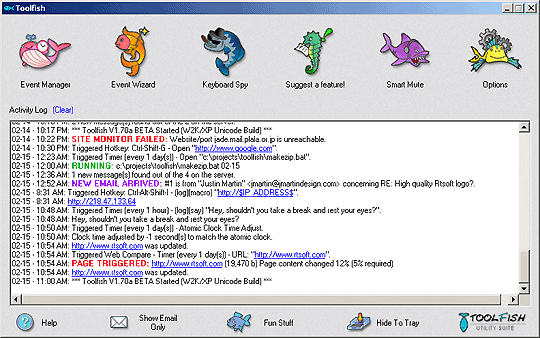
Toolfish is a powerful collection of useful utilities all grouped into one program.
Runs on Windows 7 and newer.
Toolfish is now completely free and open source! Visit the Toolfish GitHub page to download the latest version, browse the source code or report a bug.
Features
- Toolfish is a powerful tree based event scheduler based on the incredibly simple concept of 6 types of triggers and over 20 types of actions
- Web Compare - Automatically checks webpages for changes using advanced fuzzy logic and notifies you based on percent changed, keywords or date
- Site Monitor - Get notified when a site, email server or port is unavailable or gives errors such as 404 and keep statistics (notification by email, .wav, run a program, and popups supported)
- Atomic Clock Adjustment - Adjusts your clock to match the world's most accurate time piece, the atomic clock
- Talking Reminders - Use the One-Time or Recurring Reminder Wizard to quickly add a talking reminder, never forget an important event again!
- Global keystroke and application logging
- Macros with full unicode support
- Control Other Applications - Send keys, close, kill-task and send custom WM messages to any application based on .exe name or title bar text. Cause events to run if a program is or isn't running, or is or isn't currently in focus
- Smart Mute - Auto mute your computer's volume based on inactivity. Touch a key, mouse or gamepad and it instantly turns back on
- Mic Adjust - Change or force levels on individual input devices
- Stealth Mode - Hide Toolfish completely, good for watching the kids
- Unlimited Hotkey Support - Attach any Toolfish event, macro, program, website or file to a hotkey. Comes with some good ones pre-setup
- Set Volume with Smooth Fade
- Adjust Active App Volume - Change the volume of just the application currently in focus with a hotkey (Ctrl+Alt+Volume Wheel or Ctrl+Alt+Minus/Plus by default), complete with an on-screen overlay
- Switch Sound Output Device - Change the default audio output device from an event or hotkey
- Windows Dark/Light Mode Toggle - Switch Windows between dark mode and light mode (Ctrl+Alt+Shift+Volume Wheel by default)
- Paste IP Address
- Automate Logoff/Shutdown/Reboot based on conditions
- Leet-Type - Converts your typing to hacker-speak in realtime!
- Fun Statistics - Ever wondered how many miles you've moved your mouse or how many keys you've typed?
- Use the Event Manager to build your own events of any size. Virtually EVERY event can be customized with .wavs, mp3's, sending email with file attachments, popup messages, text to speech speaking, running programs and much more!
- Auto startup with boot minimized to tray (or hidden in Stealth Mode)
- Colorized event log with auto URL highlight support. This is also logged to disk and auto trimmed to 200 lines. (configurable in the options dialog)
For the latest Toolfish news, downloads and source code: visit the Toolfish GitHub page!
Read what's new since the last version
Quick tips
Toolfish comes configured with a few useful events pre-setup for you:
| Ctrl+Alt+Shift+I | Pastes your current IP address into the active window. |
|---|---|
| Ctrl+Alt+Shift+V | "Inject paste" - like a normal paste, but the text is "typed" in virtually, so it works in places where normal paste doesn't. |
| Ctrl+Alt+Volume Wheel | Adjusts the volume of just the application currently in focus. (Ctrl+Alt+Minus/Plus works too) |
| Ctrl+Alt+Shift+Volume Wheel | Switches Windows between dark mode and light mode. |
| Ctrl+Shift+G | Opens (and says) Google.com. |
| Ctrl+Alt+Shift+D | Opens (and says) Dictionary.com. |
| Ctrl+Alt+F12 | Quickly opens/shrinks Toolfish. |
| Ctrl+Alt+Shift+F12 | Toggles Stealth Mode. (hides the tray icon) |
| Ctrl+Alt+Shift+N | Opens notes.txt. Just a quick place to scribble ideas or notes. |
Any of these can easily be edited or deleted using the Event Manager.
To setup Atomic Clock Adjustment or web monitoring use the Event Wizard, it's easy!